NX Live Photo: Convert and Manage Motion Photos on Android
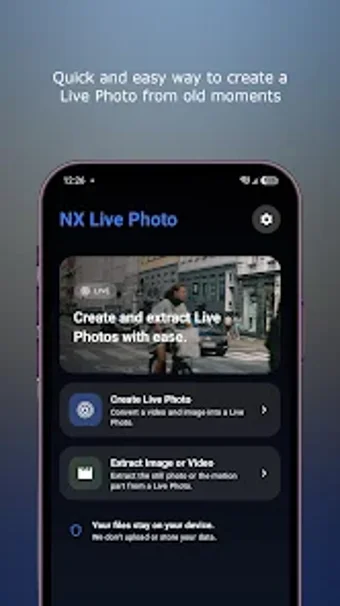
NX Live Photo by Chaldealabs helps you create, edit, and manage Live or Motion Photos on your Android device. It converts short videos into interactive gallery items, lets you extract still frames, and can export the motion component as a standalone clip, all processed locally on the device. The approach keeps the app focused on moment selection and export. You are the intended user if you handle motion-photo files or use GCam.

Unlock your creativity with Adobe Stock
Get 10 images or 1 video with a free trial
What file containers and output quality can you expect?
You can work with the motion-photo formats commonly used on Android, and the app is designed to keep the original footage fidelity during output. This matters when you need a clean still or an exact clip, since color and detail are preserved during conversion and extraction. Typical use cases include saving a sharp frame from a motion photo or producing a short gallery-ready clip without recompression artifacts.
How quickly can you get from footage to finished item?
The interface focuses on short, focused tasks so you complete conversions with few steps. A fast, minimalist layout reduces menu hunting and helps you pick frames or clips without complex timelines. If you prefer a direct, moment-oriented flow instead of multi-track editing, you can move from selection to export in a handful of taps, keeping the process compact on mobile.
How does device compatibility affect processing?
The app relies on modern Android video muxing support, so device software affects which motion-photo files you can handle and how quickly operations complete. You should expect smoother results on up-to-date devices that support the necessary media operations. When you work with large or high-resolution captures, processing time depends on your hardware’s media handling rather than external upload speed.
Where does this tool sit in a creator’s workflow?
This is a focused utility that sits between a gallery viewer and a full video editor, optimized for motion-photo tasks on Android. The developer builds small photography utilities and other Android tools, which explains the narrow scope and attention to a single workflow. You can use the app as a quick step in a larger edit pipeline or as the final converter for shareable motion items.
A straightforward gateway for motion-photo users with limited editing needs
If you want a focused way to turn short captures into shareable motion-gallery items, this app provides a low-friction entry point that emphasizes quick results. It suits anyone seeking a compact, privacy-minded utility rather than a layered postproduction suite. Those who require detailed timeline editing or advanced compositing should look to more fully featured desktop or mobile editors instead.